
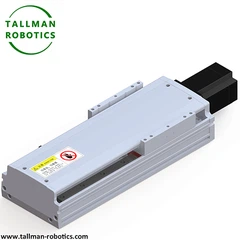


As a supplier of cam indexers, I've encountered numerous situations where customers face issues with their cam indexers. Troubleshooting cam indexers can seem daunting, but with a systematic approach, most problems can be resolved efficiently. In this blog, I'll share some valuable insights on how to troubleshoot cam indexers effectively.
Understanding Cam Indexers
Before delving into troubleshooting, it's essential to have a basic understanding of cam indexers. Cam indexers are mechanical devices used to convert continuous rotary motion into intermittent rotary motion. They are widely used in various industries, including packaging, printing, and automation. There are different types of cam indexers, such as the Cam Actuated Indexer, Rigid Cam Indexing Unit, DF Cam Indexer, Compact Cam Indexer, and Motorized Cam Indexer. Each type has its own unique features and applications.
Common Problems and Solutions
1. Inaccurate Indexing
One of the most common problems with cam indexers is inaccurate indexing. This can manifest as the indexer not stopping at the correct position or having inconsistent indexing angles.
Possible Causes:
- Worn Cam or Follower: Over time, the cam and follower can wear out due to constant friction and movement. This can cause the indexing to become inaccurate.
- Loose Mounting: If the cam indexer is not properly mounted, it can shift during operation, leading to inaccurate indexing.
- Incorrect Lubrication: Insufficient or improper lubrication can cause increased friction and wear, affecting the indexing accuracy.
Solutions:
- Inspect and Replace Worn Parts: Regularly inspect the cam and follower for signs of wear. If they are worn beyond the recommended limits, replace them with new ones.
- Check and Tighten Mounting Bolts: Ensure that the cam indexer is securely mounted to the machine frame. Check all the mounting bolts and tighten them if necessary.
- Verify Lubrication: Follow the manufacturer's recommendations for lubrication. Use the correct type and amount of lubricant, and ensure that it is applied regularly.
2. Excessive Noise or Vibration
Excessive noise or vibration during the operation of a cam indexer can indicate a problem. It can be not only annoying but also a sign of potential damage.
Possible Causes:
- Misaligned Components: If the cam, follower, or other components are not properly aligned, it can cause excessive noise and vibration.
- Worn Bearings: Worn bearings can cause the indexer to vibrate and produce noise.
- Unbalanced Load: An unbalanced load on the indexer can cause uneven forces, leading to noise and vibration.
Solutions:


- Check Alignment: Use precision measuring tools to check the alignment of the cam, follower, and other components. Adjust them as needed to ensure proper alignment.
- Replace Worn Bearings: If the bearings are worn, replace them with new ones. Make sure to use high-quality bearings that are suitable for the application.
- Balance the Load: Ensure that the load on the indexer is evenly distributed. Use counterweights or other balancing techniques if necessary.
3. Jerky or Rough Indexing
Jerky or rough indexing can make the operation of the machine less smooth and can also affect the quality of the output.
Possible Causes:
- Sticking or Binding: The cam or follower may be sticking or binding due to dirt, debris, or improper lubrication.
- Incorrect Cam Profile: If the cam profile is not designed correctly for the application, it can cause jerky or rough indexing.
- Mechanical Interference: There may be mechanical interference between the cam indexer and other components of the machine.
Solutions:
- Clean and Lubricate: Clean the cam and follower to remove any dirt or debris. Apply the appropriate lubricant to ensure smooth operation.
- Verify Cam Profile: Consult the manufacturer's documentation to ensure that the cam profile is suitable for the application. If necessary, consider replacing the cam with a different profile.
- Check for Interference: Inspect the machine for any mechanical interference between the cam indexer and other components. Make any necessary adjustments to eliminate the interference.
4. Overheating
Overheating is a serious problem that can damage the cam indexer and reduce its lifespan.
Possible Causes:
- Excessive Friction: High levels of friction due to worn parts, improper lubrication, or misalignment can cause the indexer to overheat.
- High Load: If the indexer is operating under a high load for an extended period, it can generate excessive heat.
- Poor Ventilation: Insufficient ventilation can prevent the heat from dissipating, leading to overheating.
Solutions:
- Reduce Friction: Address the causes of excessive friction, such as replacing worn parts, improving lubrication, and ensuring proper alignment.
- Optimize Load: If possible, reduce the load on the indexer or distribute it more evenly. Consider using a larger or more powerful indexer if the current one is overloaded.
- Improve Ventilation: Ensure that the cam indexer has adequate ventilation. Remove any obstructions that may be blocking the airflow around the indexer.
Preventive Maintenance
Preventive maintenance is key to ensuring the smooth and reliable operation of cam indexers. Here are some maintenance tips:
- Regular Inspections: Conduct regular visual inspections of the cam indexer to check for signs of wear, damage, or misalignment. Look for loose bolts, worn components, and any signs of leaks.
- Lubrication: Follow the manufacturer's lubrication schedule and use the recommended lubricant. Proper lubrication helps reduce friction, wear, and heat generation.
- Cleaning: Keep the cam indexer clean to prevent the accumulation of dirt, debris, and dust. Use a clean, dry cloth to wipe the surface of the indexer regularly.
- Training: Provide proper training to the operators on how to use and maintain the cam indexer correctly. This can help prevent operator errors and ensure the longevity of the equipment.
Conclusion
Troubleshooting cam indexers requires a combination of knowledge, experience, and a systematic approach. By understanding the common problems and their solutions, and by implementing a preventive maintenance program, you can minimize downtime and ensure the reliable operation of your cam indexers. If you encounter any problems that you are unable to resolve, don't hesitate to contact us. We are a leading supplier of cam indexers, and our team of experts is ready to assist you. Whether you need technical support, replacement parts, or advice on choosing the right cam indexer for your application, we are here to help. For more information and to discuss your specific requirements, please feel free to get in touch with us. We look forward to serving you and helping you achieve optimal performance from your cam indexers.
References
- Cam Indexer Handbook, Manufacturer's Documentation
- Industry Standards and Best Practices for Mechanical Drives


